Understanding Secure boot on Mobile devices
What is secure boot and how does it work?
Secure boot provides a foundation for the security architecture of the device. It is defined as a boot sequence in which each software image that is loaded and executed on a device is authorized using trusted code originally authorized by the OEM. This sequence is designed to prevent unauthorized or modified code from being run by ensuring that all code is verified before execution.
The first image in this “chain of trust” on Qualcomm chipsets is called the Primary Boot Loader (PBL). The Primary Boot Loader is stored in immutable read-only memory; it is literally part of the fabric of each chip. This initial software image cryptographically verifies digital signatures on the images that it loads. Those images cryptographically verify the digital signatures on the next set of images that they load, and so on. Hence, the user can have confidence that these images have not been altered because, in every case, a piece of trusted software checks the new image before it can be executed.
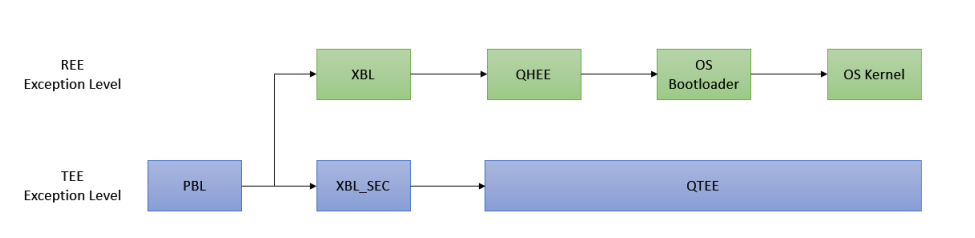
Figure 1: Secure boot sequence on Qualcomm chipsets
In the context of Android OS
Verified Boot is designed to ensure all executed code comes from a trusted source (device OEMs). It establishes a full chain of trust, starting from a hardware-protected root of trust to the bootloader, to the boot partition and the system partition. During device boot up, each stage verifies the integrity and authenticity of the next stage before handing over execution to OS kernel.
The central data structure used in AVB is the VBMeta struct. This data structure contains a number of descriptors which are cryptographically signed. During the boot process, the bootloader loads the vbmeta image from the vbmeta partition and verifies its signature. If the signature is valid, the bootloader proceeds to verify the contents of the other partitions listed in the vbmeta descriptors using their stored hashes or hash trees.
The vbmeta image is device-specific and must be unique for a given device model. It is created using ‘avbtool’, which can generate the vbmeta image by scanning metadata from other partition images, adding hashtree footers to those partitions, and then combines them into a single vbmeta image.
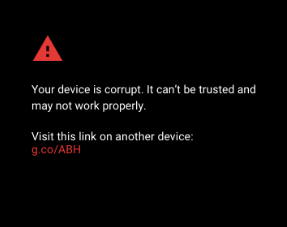
Figure 2: Device halts when image verification fails
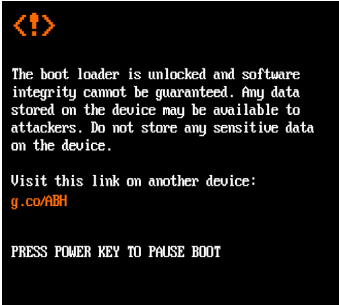
Figure 3: PBL warns when secure boot is disabled
Verified Boot also allows Android devices to communicate their state of integrity to the user. If any partition fails verification, the boot process is halted, and a warning state is displayed on screen.
Sources
- https://lwn.net/Articles/638627/
- https://source.android.com/docs/security/features/verifiedboot/boot-flow
- https://android.googlesource.com/platform/external/avb/+/master/README.md
- https://technotes.kynetics.com/2018/introduction-to-dm-verity-on-android/
- https://xdaforums.com/t/signing-boot-images-for-android-verified-boot-avb-v8.3600606/