Exploring ADCS - A Double-Edged Sword
Focuss on the less obvious risks
Cyber security threat landscape is constantly evolving, making it hard to stay ahead of potential threats. While most of the publicly documented vulnerabilities are easy to detect through automated alerts generated from SIEM/EDR monitoring tools, but there are others, more subtle, often overlooked but are just as dangerous. Active Directory Services form the technology core of all major industries from finance to manufacting, edtech to aerospace. This article focuses on a specific risks present at the heart of Windows server environments, the Microsoft AD Certificate Services (ADCS).
It details how these problems are introduced in the network and how they are abused using legitimate Windows administration tools. These issues may not always raise alarms but just one mis-configuration can cause domain-wide security compromise and it may remain undetected for long durations. Understanding and addressing them is crucial for maintaining a robust environment with very minimal attack surface.
Role of Certificate Authorities within AD environments
Certificate Authorities (CAs) issue digital certificates and confirm the identity of the certificate holder. CAs can either operate independently or be integrated with Active Directory as Enterprise CAs. In a Windows Active Directory (AD) environment, several services and features utilize certificate-based authentication for secure login and encryption. Some routine use cases:
User Authentication: Certificates with the Client Authentication EKU allow users to log on to the domain joined computers using certificates (e.g., smart cards or digital certificates).
Device Authentication: Devices can authenticate to the domain using certificates, often used in Bring Your Own Device (BYOD) scenarios.
Secure Email: Certificates are used for encrypting and signing emails. Microsoft Exchange Server uses certificates for secure email communication and encryption.
Remote Desktop Services (RDS): Certificates can be used to authenticate users connecting to remote desktop sessions.
Secure Web Services: IIS server can use certificates for secure connections (HTTPS) and client authentication.
PKI Infrastructure: Certificate Enrollment Web Service rely on certificates for secure communication and enrollment.
Windows Server Roles: Services like Terminal Services, File Services, and can use certificate-based authentication for secure access control.
Code Signing and WSUS: Used to sign software or scripts, particularly useful in Powershell code signing and update packages, ensuring its authenticity and integrity. Without a code-signing certificate, you cannot publish third-party software updates into WSUS or ConfigMgr.
Enterprise VPN and Smart Card Authentication
Certificate templates
Certificate Templates are predefined settings used by a CA to determine how certificates are issued. It helps administrators automate and standardize certificate issuance by defining important properties, permissions, and usage scenarios. These templates also define Extended Key Usage (EKU) options. It is an extension in X.509 certificates that specifies the purposes for which a certificate can be requested. It determines factors like how long a certificate is valid, its intended use, and who it applies to (is allowed to enroll).
Enterprise Security Certificate (ESC)
It is a type of cyberattack thats exploits improperly configured certificate templates to gain elevated privileges. It begins by identifying the Certificate Authority CA server. Next they enumerate vulnerable certificate templates using low privilege (standard) domain accounts. Use legitimate services to escalate privileges and move laterally within the network. Vulnerable template settings:
- contain weak or less restrictive security descriptors.
- allow Client Enrollment for non-admins, low-privilege domain users.
- allow certificates to be issued with arbitary Subject Name (SAN).
Privilege Escalation
These vulnerabilities allow attackers to escalate their privileges within the network, often requiring minimal effort. For instance, the ESC1 and ESC2 vulnerable template lets a low-privileged user impersonate a domain administrator and request admin certificates, ultimately leading to a domain-wide compromise.
ESC1 - Subject Alternative Name (SAN)
ESC1 misconfiguration allows user supplied identities within a certificate. The intended purpose of SANs is to facilitate hosting content for multiple domains on single web server. But it can be abused to impersonate high privileged users and use it to move up in the priveleged users hierarchy.
ESC1 - Excessive permissions
  Client Authentication: True
  Enabled: True
  Enrolee Supplies Subject: True
  Requires Management Approval: False
  Authorized Signatures Required: 0
ESC2 - Any purpose EKU
  Enabled: True
  Enrolee Supplies Subject: True
  Requires Management Approval: False
  Authorized Signatures Required: 0
  Any Purpose: True
Persistence
Certificates issued for the impersonated domain user or computer account can remain valid for at least 365 days (default). Certificate authentication continues to work even after password resets, it can potentially be abused for unauthorized access until the Certificate is revoked.
Fortifying the CA - Strong Mapping
“Weak mapping” refers to linking a certificate to an account simply by accepting whatever is provided in UPN or DNS name, without verifying the actual identity. This method can be risky, as it allows potential attacks if an attacker gets a certificate with a fake SAN. While responding to this problem Microsoft introduced some improvements referred to as “Strong mapping”.
Certificates now include a security extension (OID 1.3.6.1.4.1.311.25.2) that contains the objectSid of the user requesting the certificate. This helps the domain controller verify the user’s identity accurately. However, if the certificate template is misconfigured by enabling the CT_FLAG_NO_SECURITY_EXTENSION flag (0x80000), this security feature is disabled, reverting the mapping to a weaker, less secure mode.
- Where possible try to disable this option: “Enrollee Supplies Subject”
- Avoid excessive enrollment permissions: grant this to intended users only.
- admin approval for Certificate issuance: set “Requires Management Approval: True”
Specific Event logs
Monitoring certificate enrollment events helps administrators detect unusual activity and take action by revoking certificates that may be forged or suspicious.
- Event ID 4886 – Certificate Services received a certificate request
- Event ID 4887 – Certificate Services approved a certificate request and issued a certificate
- Event ID 4900 – Certificate Services template security was updated
- Event ID 4768 – A Kerberos authentication ticket (TGT) was requested
- Event ID 1007 – When a certificate is exported from the local certificate store (indicates priviled user compromise)
Remediation
There is only one reliable way to block unauthorized access, we have to revoke the affected certificates and delete its associated user account. Re-create new account with better security measures, mandate Multi-factor-authentication where possible.
ADCS Auditing tools
Invoke-PKIAudit: Audits the current Forest’s AD CS settings, primarily analyzing the CA server and published templates for potential privilege escalation opportunities.
Get-CertRequest: Incident responders can use it to find certificates the CA server had issued to the compromised user/computer (which should then be revoked).
Certipy A Powerful offensive and defensive toolkit for enumerating and abusing Active Directory Certificate Services. It helps red teamers and defenders by identifying and exploiting all known ESC1-8 attack paths.
ADCS Best Practices
Two-Tier Certificate Authority: Where possible the IT admins must consider keeping the Root CA server offline, isolated from rest of the AD network. Use separate server to perform the necessary functions as Sub-ordinate CA (SubCA) to safely handle certifate requests.
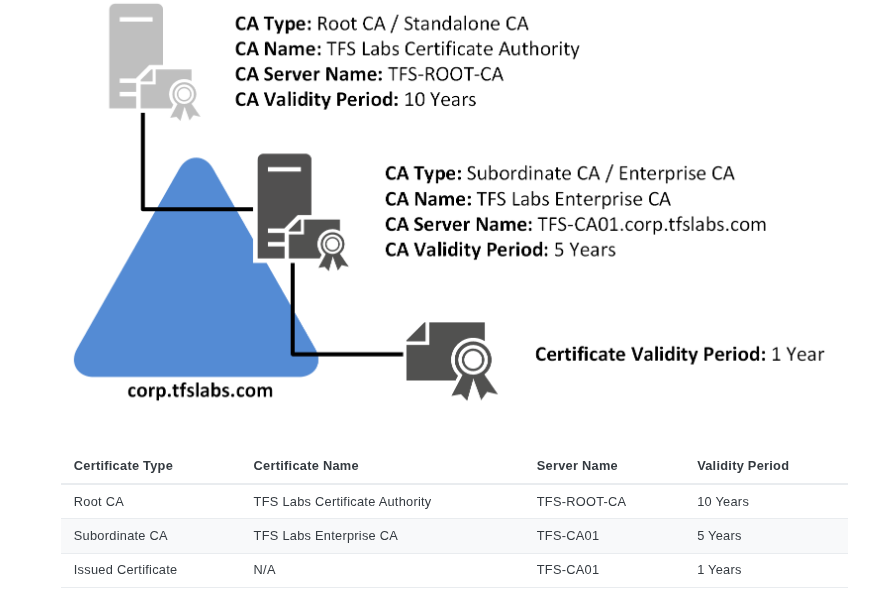 Source: https://docs.mjcb.ca/microsoft/windows-server/windows-server-roles-features/adcs/adcs-windows-server-2022/
Classify CA servers - Tier 0 asset
Tier 0 assets represent the most critical IT assets, such as domain controllers in an on-premises Active Directory environment. These assets are considered the most privileged and are primary targets by attackers, so they must be strictly managed and accessed only by a small group of authorized personnel. This emphasis goes beyond the root CA and extends to subordinate CAs recognizing their role in domain authentication.
Audit Published templates
Administrators publish templates by adding them to the certificate templates attribute of an Enterprise CA’s AD object. These can be viewed using tools like certsrv.msc, Certify.exe, or Certutil.exe. To improve security, unused templates should be regularly removed from all CAs to reduce misconfiguration risks and vulnerabilities. Regular auditing of published certificate templates helps find security gaps in the on-prem environments.
Enable Extended Protection for Authentication (EPA)
It enhances the security of authentication processes by ensuring that only trusted servers can authenticate users. EPA relies on the use of Extended Protection Policies, which define which servers are allowed to authenticate users. These policies are enforced by the client during the authentication process, ensuring that only servers with valid certificates and proper permissions can participate in the authentication flow. This adds an additional layer of security, especially in environments where users might connect to different domain controllers or external authentication points.
Sources
https://github.com/ly4k/Certipy
https://github.com/dirkjanm/PKINITtools
https://www.specterops.io/assets/resources/Certified_Pre-Owned.pdf