Significance of Virtual Private Cloud
Key Terminology
- VPC, ECS, ECR, EC2
- Subnets and CIDR Range
- NACL and Security Groups
- NAT and Internet Gateways
Virtual Private Cloud
VPC is the most important concept in the cloud security ecosystem. Imagine it as a room where you put your servers or services, such as a database, EC2 instance. Just like LAN (Local Area Network), the computers inside the room can freely communicate with each other, but we have to set up gateways to connect with the outside world (Public internet). We can set up public and private subnets, and those in private subnets cannot be accesed from the outside world.
It is important to set up a vpc before anything (EC2, ECS, RDS, ELB and so on) since later on, you will be connecting and forwarding traffic through Route53 to the designated VPC. For example, We want to launch a simple django application using AWS. The general workflow would look something like this:
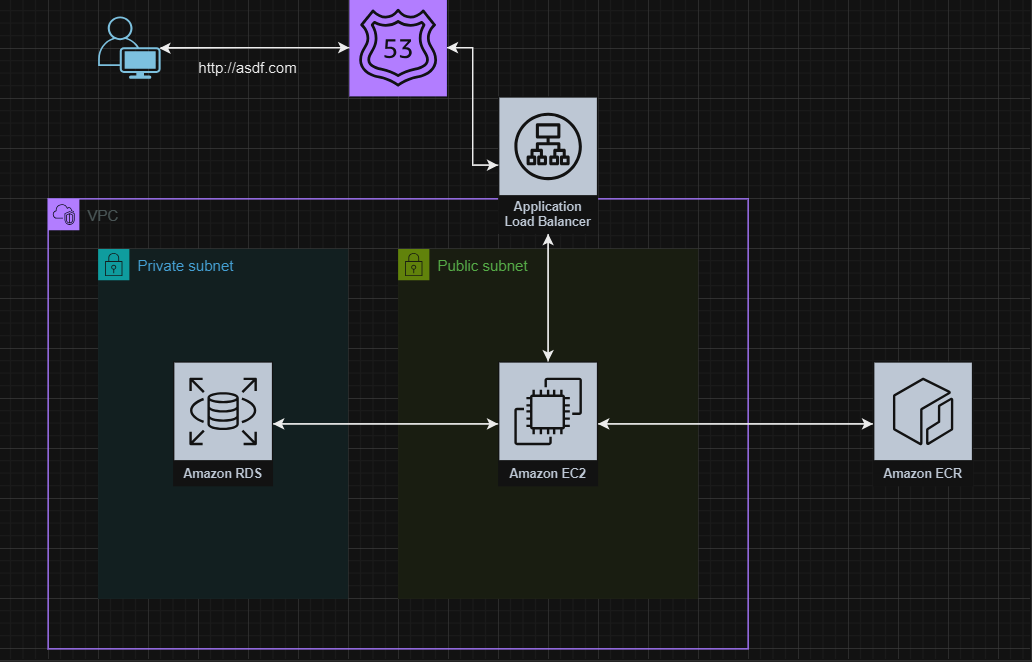
- Set up VPC and SG (Security Group)
- Place the DB, either using RDS or running in EC2, in private subnet, since we do not want it to be accessible from the outside world.
- Configure the DB setting in Django accordingly
- Create a docker image for Django application
- Upload it to ECR (Elastic container registry)
- Launch using ECS (Elastic container service) or EC2, which will also be placed in the Public subnet
- Set up hosted zone in Route53
- Create target group for Django running in the VPC
- Create ALB (Application Load Balancer) and connect it to the target group
- Connect ALB to the hosted zone and register domain, SSL certificates
In the example above, the Django application can freely access its DB in private subnet since they are in the same VPC, but anybody outside the VPC can’t make any requests to the DB. Neither can we directly SSH into it. There are some key concepts of VPC that we will discuss in this post. Public/Private Subnets, NAT Gateways and CIDR ranges.
Subnets & CIDR Ranges
Subnets are basically sub-divisions (segments) of a network. As we have seen from the example above, one of the main reasons why we divide the VPC into subnets is to manage their IP addresses and traffic separately, and to improve security.
Subnets
Private subnets cannot be accessed from the outside world. It also cannot connect to the outside world from inside. That is why we have to set up Gateways.
Public subnets are, literally, public. Instances can access the outside world, and the outside world can directly access any hosts allocated in the public subnets. However, the only limitations are the Security Groups..
CIDR (Classless Inter-Domain Routing) Ranges
CIDR ranges are basically the range of IP addresses for your hosts in your subnet. When you create your subnets in aws, it will ask for something called an CIDR Range. It called a CIDR notation. It tells us how many bits are reserved for the network ID, and how many are for hosts.
10.0.0.0/24
So an IP address is made out of 4 blocks, each represented by 8 bits, total of 32 bits. The number that comes after the / symbol tells us how many digits cannot be changed. Those bits that cannot be changed are called network bits. And those that can be changed, are called host bits.
10.0.0.0/24means we can only change the last digit, so it would look like10.0.0.0 ~ 10.0.0.255so 2^8 total usable ip addresses
10.0.0.0/16means we can only change the two digit10.0.0.0 ~ 10.0.255.255so 2^16 total ip addresses
10.0.0.0/8means we can change the last three digits10.0.0.0 ~ 10.255.255.255so 2^24 total ip addresses
Subnet Masks
A subnet mask is a four-octet number used to identify the network ID portion of a 32-bit IP address. So, for the subnet mask, 255 means all are for network ID, and 0s are for hosts.
- e.x:
10.0.0.0/8–> subnet mask255.0.0.0
NACL & Security Groups
Now that we have created subnets, we have to manage what kind of traffic can go in and out from our subnets. We want everything to be able to come in and out in our public subnet, and nothing for our private subnet. the NACL (Network Access Control List) takes care of that. By default, when you create a VPC, a NACL is also created automatically. It consists of two rules, one rule that allows everything in and out for public subnets, and one that allows nothing for private subnets.
Security groups are firewall for your instances in a VPC. For instance, we may want to open only the http/https inbound traffic on specific EC2 instance running Django but SSH from only one IP address. Security groups take care of these conditional access requirements.
Gateways
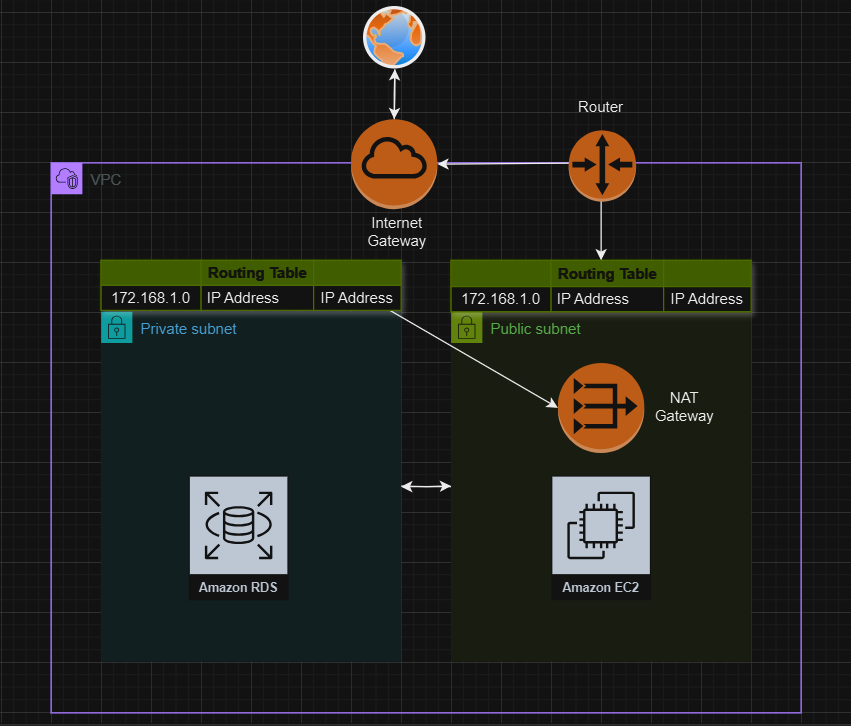
There are several types of AWS gateways, but in this post we will only discuss about NAT and Internet gateways.
Internet gateways take care of the internet connection. AWS will automatically create one if we choose the fast or simple create method. AWS will create an internet gateway, and hook them up to the routing table.
NAT gateways NAT gateways allow the instances in the private subnet to reach out to internet. For instance, we would want the EC2 instance running postgreSQL DB in private subnet to be able to fetch updates from the internet. So we would need to setup a NAT gateway.
Note: NAT gateway only allow outbound traffic, so the internal services would isolated from public access.
Routing tables
A routing table defines the path that network traffic takes to reach its destination. Each subnet in a VPC is associated with a routing table.
Public Subnet: The routing table for the public subnet typically includes a route to the Internet Gateway (IGW), allowing instances in this subnet to communicate with the internet.
Private Subnet: The routing table for the private subnet usually includes a route to a NAT Gateway or NAT Instance (if configured), enabling instances in this subnet to access the internet for outbound traffic while keeping their IP addresses private.
This setup ensures that traffic from the private subnet can reach the internet without exposing the private instances directly to the internet.